Quick answer
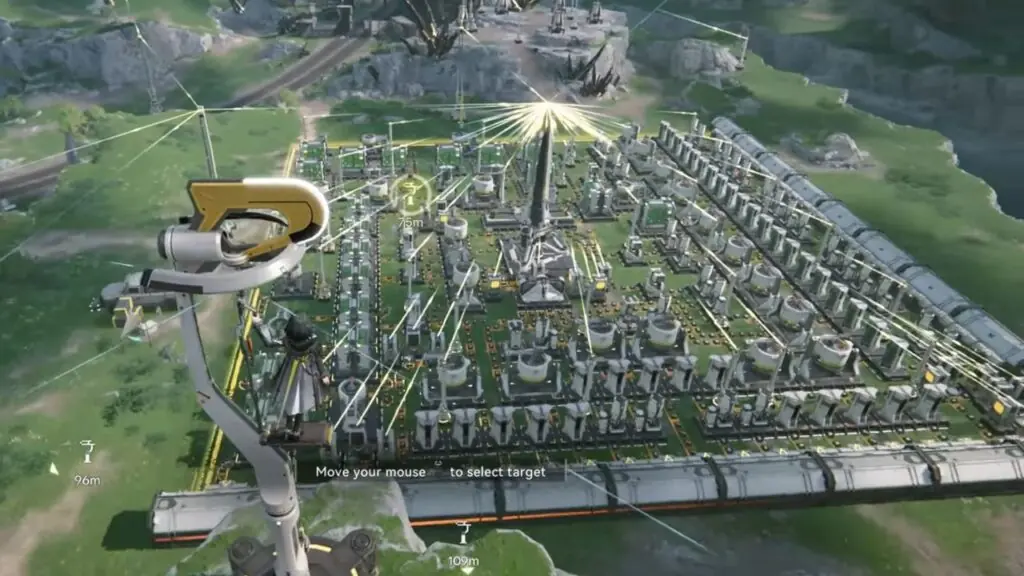
The AIC Factory is Arknights: Endfield’s Automated Industry Complex: a connected production system where facilities process inputs, transport systems move materials, power keeps the network running, and storage or depots handle the wider logistics loop. In Version 1.4, the safest way to start is to read the current AIC Plan and Production Chain shown by your client, then connect only the facilities needed for the task in front of you.
There is no evidence-backed universal first layout, machine ratio, unlock mission, or “perfect” factory for every account. This guide explains how the pieces fit together so you can read the system before you expand it.
What the AIC Factory is
The AIC Factory turns a requested material or facility requirement into a visible production chain. You provide the relevant inputs, place the facilities that process them, connect the supported logistics systems, and inspect the resulting output in the current interface. The exact chain depends on the requirement, region and facilities available to your account.
The AIC is therefore more than a row of machines. It sits alongside exploration, missions and regional development. A current requirement may ask for a particular facility or material, while the client shows the production path and connection feedback needed to reach it.
When the factory becomes relevant
Pay attention to the AIC when a current mission, AIC Plan or facility requirement brings it into your next objective. Official Endfield material documents AIC systems and guidance surfaces, but the sources reviewed here do not establish one universal unlock mission or Authority Level that applies to every player.
Wuling’s Version 1.4 content gives a concrete example: Homecoming adds a gas-oriented AIC mode with gas plans, facilities and related simulations. That example shows how the system can expand; it should not be treated as a claim that every player reaches the same feature at the same point.
If you are still learning the wider game loop, start with the Arknights: Endfield beginner guide before treating a factory prompt as an optimisation problem.
The basic production flow
1. Read the requirement and the plan
Start from the requirement currently shown in the client. AIC Plans and Research Criteria provide the goal and the conditions around it. Open the relevant Production Chain view instead of relying on an old screenshot or an undated recipe list.
2. Identify inputs and facilities
The chain shows which inputs a facility expects and what it can produce. Place the facilities needed for that current chain, then use the placement feedback to check whether the selected location and connections are valid. A facility’s presence alone does not prove that the complete chain is supplied.
3. Connect the transport systems
Belts and pipes carry different kinds of material through the factory. Conduits handle power transmission. Their paths and connection rules are separate, so a belt that looks connected does not confirm that a pipe or conduit is also working.
Homecoming documentation also describes clearer connection feedback, saved conduit states in blueprints, and a longer straight-line conduit option. These are interface and construction aids; they do not establish a universal distance, speed or throughput rule for every network.
4. Check the output and storage context
Inspect where the chain sends its output and how the current region’s storage or depot actions handle it. Version 1.4 notes include remote stashing and regional logistics context, but exact capacity limits and every input/output rule are not confirmed by the reviewed sources. Treat the live client’s feedback as the authority for the facility you are using.
The systems to keep separate
| System | What it does | What to check |
|---|---|---|
| Facilities | Process the inputs required by a production chain. | The current requirement, facility mode and placement feedback. |
| Production Chain | Shows the relationship between inputs, processing and output. | The chain currently displayed by the client, not an old recipe image. |
| Belts | Carry the material type assigned to belt logistics. | Direction, endpoints and the connection feedback shown in the placement view. |
| Pipes | Move the pipe-based resource through compatible facilities. | The pipe path and the flow or connection state shown by the client. |
| Conduits | Transmit power to the relevant network. | A valid route and the current power state; conduit rules are not belt rules. |
| Storage and depots | Provide the documented stashing and regional logistics context. | Where inputs and outputs are expected to be stored in the current task. |
| Power and Backup Power | Keep a region or facility network supplied under the documented conditions. | Whether the current network has power and whether Backup Power is available. |
Power is its own check. Official material documents low-power controls and Backup Power in the relevant conditions, but it does not support a universal capacity, drain, cost or network-limit claim for this fundamentals guide.
What Version 1.4 changed
Homecoming, identified by official PlayStation coverage as Version 1.4, expanded the AIC with Wuling’s gas production mode, gas plans and facilities, simulations, and related blueprint and production-chain work. The same version material documents remote stashing and improvements to placement and connection feedback.
The practical takeaway is that Version 1.4 gives you more system context to inspect in the client. It does not remove the need to read the current requirement or make one old layout correct for every account.
Dreamscape of Wind and Snow development notes also discuss interface improvements such as Continue Placing and feedback around selecting multiple blueprint objects. Those notes are useful context for the direction of the tools, but a development announcement is not a replacement for a current client confirmation. Do not assume an announced convenience feature changes the underlying production rules unless the live game or a later official notice confirms it.
Before you expand the factory
Use this short checklist whenever a new AIC task appears:
Factory checks
Read the system before you optimise it
- Read the current AIC PlanConfirm the goal and Research Criteria shown on your account.
- Open the Production ChainTrace the inputs, facility steps and output for this task.
- Place only what the chain needsUse the facility mode and placement feedback rather than an assumed universal order.
- Check each connection typeVerify belts, pipes and conduits independently.
- Inspect power and storageConfirm the network state and the depot or stashing context before expanding.
- Recheck after an updateVersioned interfaces and facility options can change; use current official notes and the live client.
Common mistakes
- Copying a beta layout as a permanent answer. Early previews and shared blueprints are versioned reference material, not proof of a current universal solution.
- Treating one connection as the whole network. Belts, pipes and conduits have different jobs and feedback states.
- Optimising before identifying the requirement. A layout designed for an imagined recipe can be irrelevant to the current AIC Plan.
- Assuming a Wuling gas example is a universal unlock path. It is a Version 1.4 example tied to documented progression context.
- Turning an interface announcement into a mechanic claim. Continue Placing or blueprint-selection improvements do not by themselves establish new production limits, ratios or speeds.
What this guide does not optimise
This is a system orientation guide, not an early factory Build. It does not provide a starter layout, production ratios, throughput calculations, machine timers, power budget, blueprint, or guaranteed progression route. Those decisions require a separate, current activity-specific brief and should not be inferred from the fundamentals above.
What to do next
When the client gives you a concrete requirement, follow its Production Chain and use the checks above to diagnose the current setup. For broader account, exploration and first-session context, return to the Endfield game hub. Recheck official notes after material AIC, placement, logistics or power changes before relying on an older explanation.