Quick answer
Choose the server that matches the progress and account setup you intend to keep. Arknights: Endfield officially documents Asia and Americas / Europe as separate server environments, and data is not shared between them. PC, Android, iOS, and PS5 progress can sync within the same server when the official account conditions are met. PS5 players should check their PSN region and linking path before first login.
Arknights: Endfield server regions explained
Asia Server
GRYPHLINE lists an Asia Server for Arknights: Endfield. On PS5, the game server is assigned automatically according to the region of the PSN account; GRYPHLINE gives Hong Kong as an example of a PSN region assigned to Asia. Manual server selection on PS5 is not currently supported. Official PSN Account FAQ
Americas / Europe Server
GRYPHLINE’s official materials use Americas / Europe Server as the other documented server name. North America is given as an example of a PSN region assigned to it. The official FAQ does not establish whether the Americas and Europe have further internal divisions for data, matchmaking, or social features, so this guide treats “Americas / Europe” as the publisher’s documented label rather than making further assumptions. Official PSN Account FAQ
What is confirmed about data separation
Asia and Americas / Europe data are not shared. GRYPHLINE states that progress on the Americas / Europe server is not shared with the Asia server. This matters more than a generic server recommendation: choose carefully if you want to keep existing progress. Official PSN Account FAQ
Which Endfield server should you choose?
There is no universal best server. Use the factors below to make the choice that fits your account, platforms, and intended social setup.
| Check first | What is confirmed | How it should affect your choice |
|---|---|---|
| Existing progress | Asia and Americas / Europe do not share account data. | If you already have progress you want to keep, stay with that server environment unless official support documents a different option. |
| PS5 and PSN region | On PS5, the server is assigned from the PSN account’s region; manual selection is not currently supported. | Check the PSN region before a first PlayStation login, especially if you already play on PC or mobile. |
| Intended platforms | PC, Android, iOS, and PS5 can share data within the same server under the official account-linking conditions. | Confirm that every platform you plan to use follows the same account and server path. |
| Friends | Endfield Friends are visible across linked platforms. | Ask friends which server they use before committing if playing together matters. GRYPHLINE’s current FAQ does not establish cross-server social, matchmaking, or multiplayer behaviour. |
| Location or latency | No official latency guidance was found. | Do not treat country, ping assumptions, or server-population claims as a reliable reason to choose one server. |
If you already have progress
If you already play on Asia or Americas / Europe, that progress is not shared with the other server environment. The safest decision is to preserve the server tied to the progress you intend to continue using. This is a decision framework, not a claim that an official transfer is unavailable: no official cross-server transfer path was found as of 30 August 2026. Official PSN Account FAQ
If you plan to play on PS5
PS5 does not currently offer manual server selection. GRYPHLINE says the game server is automatically assigned from the region of your PSN account. Check that region before your first login, then follow the correct linking flow for your account state. Official PSN Account FAQ
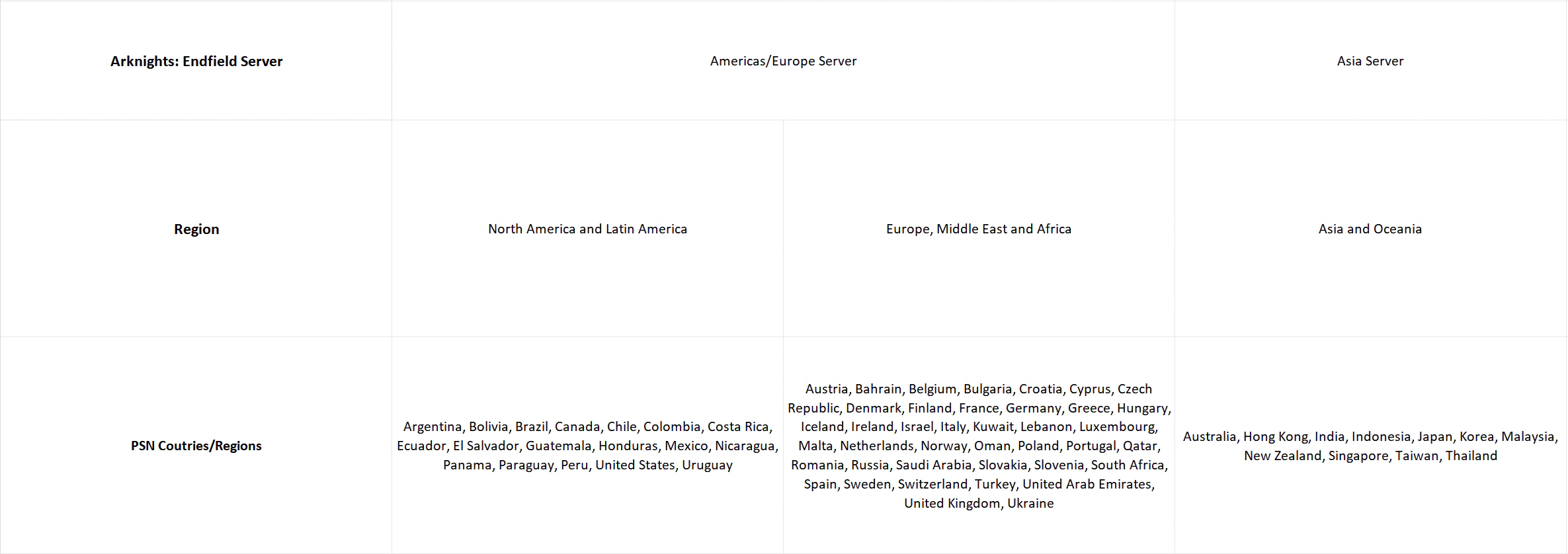
GRYPHLINE’s PSN FAQ maps PSN account regions to the Americas / Europe and Asia server environments.
If friends influence your choice
Friends can be a sensible factor because the game has an Endfield Friends list visible across linked platforms. However, the official sources used for this guide do not confirm whether friends, matchmaking, ship visits, or multiplayer features work across Asia and Americas / Europe. Do not promise cross-server play; verify the current situation through official support before committing progress around that assumption. Official PSN Account FAQ
Cross-platform progression explained
PC, Android, and iOS
Can I play Arknights: Endfield on PC and mobile with the same account? Yes. GRYPHLINE states that account data is shared across PC, Android, and iOS within the same server. On these platforms, players log in with a Gryphline Account. Official PSN Account FAQ
PlayStation 5 and a linked Gryphline Account
Can I continue PC or mobile progress on PS5? Yes, when an eligible PSN account and Gryphline Account are linked and the progress is on the same server. On PS5, you log in with the linked PSN account; on PC, Android, and iOS, you log in with the Gryphline Account. Those platform-specific login methods do not become interchangeable after linking. Official PSN Account FAQ
GRYPHLINE also confirms that GeForce NOW uses the Asia and Americas / Europe servers and keeps data synchronized across devices and platforms within the same server. This is useful for players considering cloud access, but it does not change the server-separation rule. Official GeForce NOW FAQ
What cross-save does not mean
Cross-save means that the same account data can continue across supported platforms within the same server. It does not mean that Asia progress appears on Americas / Europe, or that the game’s official materials confirm universal cross-platform multiplayer between all devices and server regions.
Account linking and first-login rules on PlayStation
Existing mobile or PC progress
To continue existing mobile or PC progress on PS5, GRYPHLINE’s documented scenario requires a PSN account that has not previously logged into the game. At that account’s first PlayStation login, follow the prompt to link the email of the existing Gryphline Account. This is the official route for joining the two account states; do not skip the prompt if the goal is to preserve existing progress. Official PSN Account FAQ
Existing PlayStation progress
If the PSN account already has Endfield progress, GRYPHLINE says it can be linked only to an email address that is not already registered as a Gryphline Account. The documented route is Settings → Platform & Account → User Center → Link Email on PlayStation. Once that link is complete, the account can continue on the same server across the supported platforms. Official PSN Account FAQ
Login methods by platform
| Platform | Documented login method after linking |
|---|---|
| PC, Android, iOS | Gryphline Account |
| PlayStation 5 | PSN account |
GRYPHLINE states that a PSN account cannot be used to log in on PC/mobile, and the linked Gryphline Account email cannot be used directly to log in on PlayStation. Each PSN account can bind to one Gryphline Account, and each registered Gryphline email can bind to one PSN account. Official PSN Account FAQ
Can you transfer progress between servers?
Can I transfer Endfield progress between servers? GRYPHLINE confirms that Asia and Americas / Europe data are not shared. No official cross-server transfer path was found as of 30 August 2026. That is not proof that a transfer can never exist; it means this guide does not have an official migration procedure to recommend. Recheck official account and support notices before relying on an older answer. Official PSN Account FAQ
PC, mobile, and PlayStation scenarios
| Your starting point | Safer documented next step |
|---|---|
| You play on PC/mobile and want to add PS5 | Before the first Endfield login on PS5, use a PSN account that has not previously logged into Endfield and follow the prompt to link the existing Gryphline Account email. |
| You started on PS5 and want PC/mobile access | In the PlayStation User Center, link an email that is not already registered as a Gryphline Account, then use that Gryphline Account on PC/mobile on the same server. |
| You only plan to use PC/mobile | Use the Gryphline Account that holds the progress you intend to keep, and confirm the selected server before creating another character. |
| You want to use more than one platform | Confirm account state, server, and PSN first-login status before assuming the second platform will continue the same progress. |
Common mistakes to avoid
- Treating cross-platform progress as cross-server progress. The official rule is same-server synchronization, not data sharing between Asia and Americas / Europe.
- Logging into Endfield on PS5 before deciding whether to link existing PC/mobile progress.
- Trying to link a PSN account with existing Endfield progress to an email already registered as a Gryphline Account.
- Assuming a PSN login works on PC/mobile, or that a Gryphline Account email is the PlayStation login method.
- Treating an absence of a documented transfer path as proof that migration is impossible.
- Choosing a server based on unsupported claims about latency, population, matchmaking, spending, or cross-server social features.
What to check before you start
Decision checklist
Check these six points before you start
- Server environmentWhich server environment will hold the progress you intend to keep: Asia or Americas / Europe?
- PSN regionIf you will use PS5, what region is your PSN account assigned to?
- PSN first-login statusHas that PSN account already logged into Endfield?
- Gryphline emailIs the email you want to use already registered as a Gryphline Account?
- Platforms and login methodWhich platforms will you use, and are you following their documented login method?
- Friends and serversIf friends are part of the decision, have you confirmed their server through an official or in-game source rather than assuming cross-server compatibility?
Once your server and account path are settled, see what to do first in Arknights: Endfield for a separate, non-ordered orientation to the early systems presented by the live client.